











The Champion Bet mobile application gives Android users in the Republic of Congo access to sports betting, live markets, casino games, and account tools without relying on a browser for every visit. Its touchscreen layout is intended for smartphones and tablets, making it easier to check odds, follow an event, or review an open bet while away from a computer.
Before installing any betting software, make sure you are using your own device and a private connection. The app is intended for adults aged 18+. Keep your account password private, and use the same care with deposits and withdrawals that you would use on the website.
Champion Bet APK Download
An APK is the installation package format used by Android. Downloading an APK provides the application as a single file that the device can install directly. This can be useful when an app is not offered through Google Play or when the operator provides its Android installer on its own website.
Use the operator's official source rather than a file-sharing page or a link sent by an unknown contact. Unofficial files may be outdated, altered, or incompatible with your account. Check the file name before opening it, avoid granting permissions that do not relate to normal app operation, and cancel the installation if Android displays an unexpected warning.
Latest Champion Bet APK Version
A current version can contain fixes for loading problems, display errors, or issues that occur on particular Android releases. Updates may also improve how live markets refresh and how the app handles network interruptions. If a feature stops working after an Android system update, installing the current app release is a sensible first step.
Do not assume that every update changes the layout or adds new games. The practical benefit is often stability and compatibility. Download an update only from the same official source used for the original installation, and allow the previous installation to finish before opening the app again.
How to Install Champion Bet APK
Installation normally takes only a few minutes. Charge the device if its battery is low, use a reliable connection, and leave enough free storage for the downloaded file and the installed application.
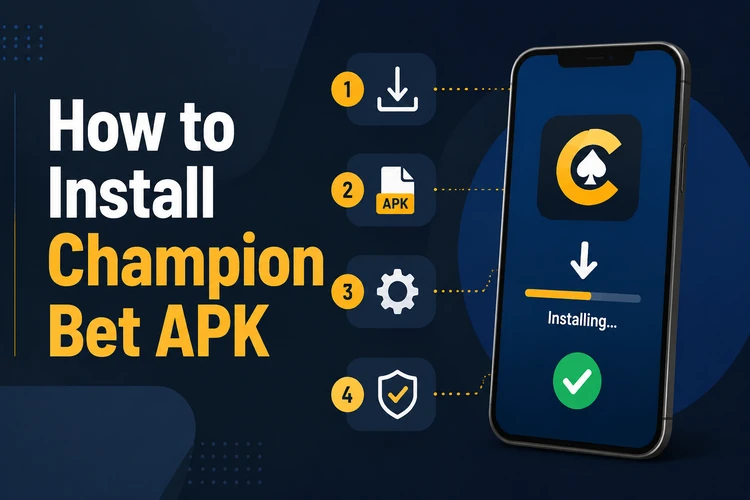
- Step 1: Download the APK through the official website using the browser on your Android device. The file is usually saved in the Downloads folder.
- Step 2: Open Settings and find the security or privacy option for installing unknown apps. Allow the browser or file manager that downloaded the file to install it.
- Step 3: Open the Downloads folder and tap the APK file. Android will show the installation screen and the permissions requested by the app.
- Step 4: Review the information on screen, then select Install if it matches the app you intended to download. Do not approve an installer that looks unfamiliar.
- Step 5: Wait for Android to confirm completion, then tap Open. You can remove the downloaded installer afterward if you need storage space; this does not remove the installed app.
- Step 6: Sign in with existing account details. If you are new, complete registration in the app and follow any verification steps requested before making a transaction.
If the installation does not start, check that the file finished downloading and that the permission applies to the correct browser or file manager. You can switch off the unknown-apps permission after installation for additional device security.
Why Use the Champion Bet Mobile App
The app keeps common account functions in one place: reviewing open bets, checking settled wagers, viewing balances, and following sports markets. Its touch-focused controls can be more convenient than a mobile browser when switching between events or entering stake amounts.
For live betting, odds and market availability can change quickly. Check the selection, odds, stake, and potential return shown on the bet slip before confirming. A live market can close or refresh while you are deciding, so never rely on a price displayed several moments earlier.
The casino area is also adapted to smaller screens, with games such as slots, roulette, and blackjack available where offered. Notifications can be useful for account or bet updates, but they should be adjusted in device settings if they become distracting. Set a budget before playing and use the tools described on the responsible gambling page if you need help controlling your activity.
Updating the APK
Check for updates when the app asks you to do so, after a major Android update, or if you notice repeated errors. Download the new APK from the official source and install it over the existing version. Android should treat it as an update when it comes from the same app source.
Normally, an update keeps the installed app and its settings in place, but it is wise to confirm that you know your login details before proceeding. Avoid deleting the old app first unless the installer specifically instructs you to do so. If an update fails, restart the device, confirm available storage, and download the file again from the official source.
Keeping the application current helps maintain compatibility with the platform and your device. Install only versions you can verify, protect your account credentials, and take breaks whenever betting stops being enjoyable or affordable.
FAQ
The Champion Bet APK is the Android installation file for the mobile application. It lets an Android device install the app directly without using Google Play. Once installed, the app can provide access to available sports markets, casino content, and account functions.
An APK is safest when it comes directly from the operator's official source. Avoid files from third-party download pages, messaging links, or modified installers. Check the Android installation screen before approving it, and keep your device software and app version up to date.
Download the file, allow your browser or file manager to install unknown apps in Android settings, and open the downloaded APK. Review the installation screen and tap Install. When Android confirms completion, open the app and sign in or create an account.
Yes. Download the newer APK from the same official source and install it over the existing app. Android will usually recognise it as an update. Make sure you have enough storage and know your login details before starting the process.
The app can be downloaded and installed without an app subscription fee. Deposits are required only if you choose to place real-money bets or play paid casino games. Check the payment information shown in your account before confirming any transaction.
Compatibility depends on the Android version, available storage, and the device model. Most current Android smartphones and tablets can install APK files, but older devices may have limits. If installation fails, update Android where possible and check the app's current requirements on the official source.